The Internet Banking application https://btpay.bancatransilvania.ro/, hereinafter referred to as BT Pay Web, is owned by BANCA TRANSILVANIA S.A. (hereinafter referred to as “the Bank” or “BT”), a credit institution and Romanian legal entity with its registered office in Cluj-Napoca, 30-36 Calea Dorobanților Street, Cluj, telephone 0264 308028, registered with the Trade Registry under no. J1993004155124, with unique registration code RO 5022670.
The BT Pay Web Internet Banking application is owned by Banca Transilvania S.A. and uses cookies.
The information provided below is intended to inform you about what cookies are, as well as how BT Pay Web places and uses them.
If you need more information about cookies and cannot find it in this Policy, you can email us at contact@btrl.ro or call the BT Contact Center at 02648028 (or *8028). Regarding the processing of personal data in connection with the use of cookies, you may also contact the Data Protection Officer (DPO) appointed by BT at the email address dpo@btrl.ro.
What is a "cookie"?
What is a "cookie"?
Cookies are small files consisting of letters and numbers that are stored by the browser you use to enhance your Internet browsing experience. These files allow a website to recognize a user’s device. They contain information that links a user of the website to a web server (the website). If a user visits that website again, the web server will read the previously stored information.
A cookie will not adversely affect your computer, mobile device, or other equipment, and it will not store any personally identifiable information.
A cookie consists of two parts: the name and the content or value of the cookie. A cookie has a fixed lifespan; technically, only the web server that sent the cookie can access it again when a user returns to the website associated with that web server.
Through the settings in the browser you use to browse the Internet, you can allow or block cookies. Cookies cannot be used to run programs or transmit computer viruses.
By using cookies, you'll enjoy a better browsing experience.
The BT Pay Web Internet Banking applicationhttps://btpay.bancatransilvania.ro/ uses session cookies (stored in memory) and persistent cookies (stored on the hard drive). Persistent cookies are stored in the Cookies folder within the user profile folder or in the WINDIR\Cookies folder.
The BT Pay Web Internet Banking application https://btpay.bancatransilvania.ro/ does not store personal information. The cookies used in this application are used solely for technical purposes strictly related to the application’s operation (such as remembering the language selected by the user when accessing the application, maintaining a stable and secure session, etc.), which is why blocking them will make it impossible to use the application.
What types of cookies does it use?
What types of cookies does it use?
The BT Pay Web Internet Banking App? The BT Pay Web Internet Banking App uses session and persistent cookies, as well as first-party cookies, for the following purposes:
1. Strictly Necessary Cookies
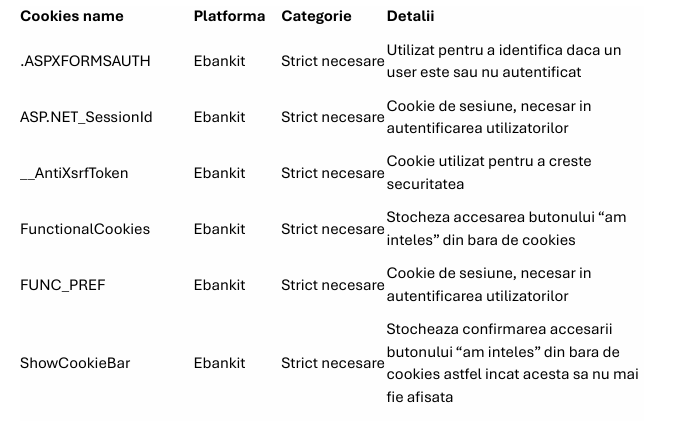
These cookies are necessary for the BT Pay Web application to function and cannot be disabled in our systems. They are typically set only in response to actions taken by visitors to this application, through which they request various services, such as setting privacy preferences, logging in, or filling out forms. In the browser they use, visitors (users) can choose to block these cookies or receive a warning about them, but in that case, certain parts of the application may not function properly.
These types of cookies are exempt from the rule requiring consent for their placement.
2. Functional cookies
These cookies enable certain sections of the BT Pay Web app—such as live chat and visual assistance—to function optimally or, where applicable, in a personalized manner. These cookies may be set by us or by our partners, whose services we have integrated into the app. If you do not allow these cookies, the chat and visual assistance features will not work.
The list of these cookies and the third parties that set them can be found in the following list:
How to Manage Cookies
How to Manage Cookies
You can change your cookie settings on BT Pay Web (with the exception of strictly necessary cookies) by accessing the Cookie Settings menu. This menu can be found both in the cookie banner of the BT Pay Web Internet Banking application and in its footer. You can also configure the browser you are using to block all types of cookies, including necessary ones.
Please note, however, that in such a situation, the websites you visit (including the BT Pay Web Internet Banking app) may not function properly. If you wish to block cookies, please configure the following settings in the web browser you are using:
Google Chrome:
- Click the wrench icon and select "Options" from the list
- Click the "Advanced Settings" tab
- Click on "Content Settings" in the "Privacy" section
- Select the settings you want
- Click the X to close.
Mozilla Firefox:
- Select "Tools" from the main toolbar, then "Options"
- Click on the Privacy tab
- Select the settings you want
- Click OK to close.
Internet Explorer:
- Click the Settings / Tools icon
- Click on Internet Options
- Click on "Privacy" and then select your options
- Click "Apply" and then "OK" to save your preferences.
Security and Privacy Issues
Security and Privacy Issues
To avoid cyberattacks that use cookies, we recommend that you make sure the browser you're using is always up to date.
The data collected by cookies is generally anonymous. In cases where cookies process personal data, you are entitled to the rights set forth in Banca Transilvania’s Privacy Policy, which can be found at the following link: https://www.bancatransilvania.ro/politica-prelucrare-si-protectie-date-personale/.